Image
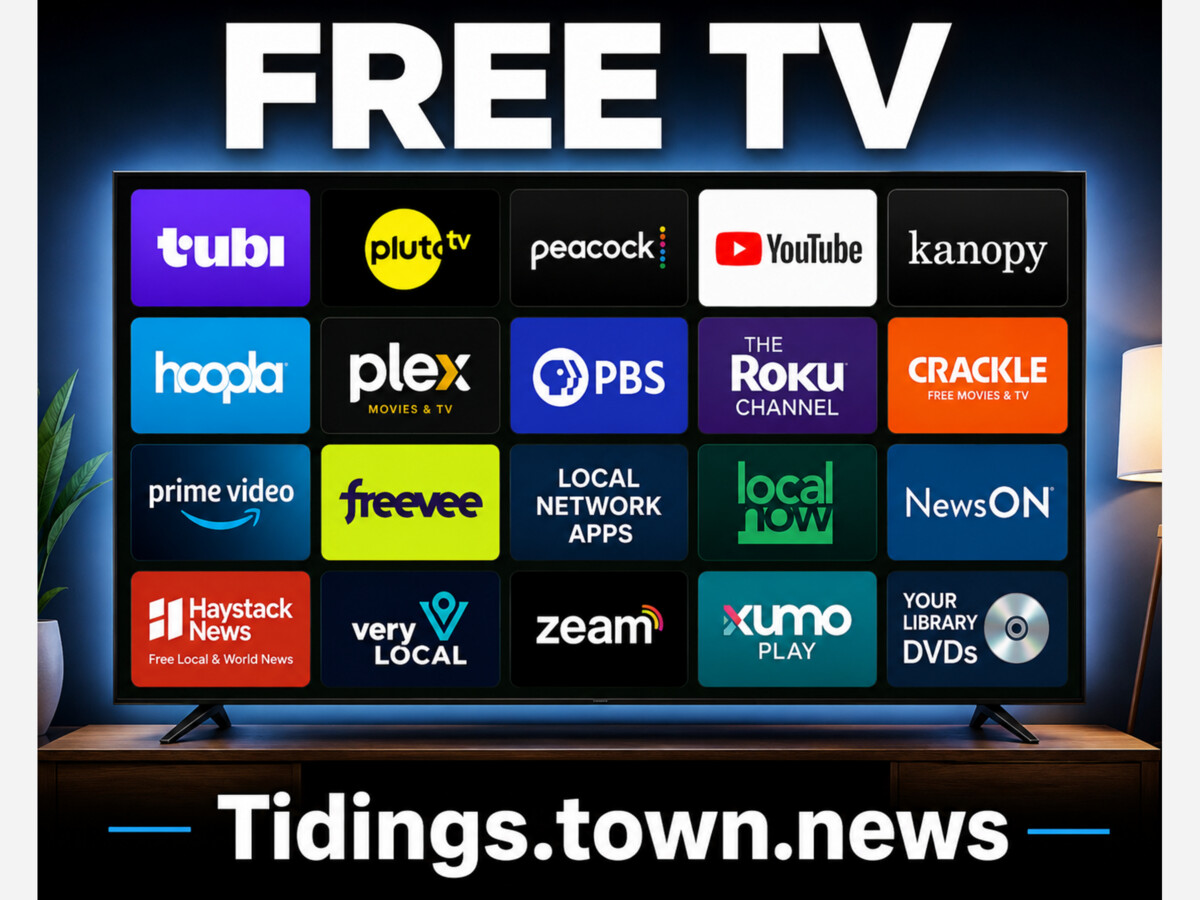



Streaming was supposed to be the escape hatch from cable television. For many households, it has become a second cable bill.
The original promise was simple. Consumers could drop expensive cable or satellite packages, pick a few low-cost apps, and watch what they wanted without installation appointments, equipment rentals or long-term contracts. That promise still exists, but it now requires more discipline.
Netflix now starts at $8.99 per month with ads and rises to $26.99 per month for Premium. Paramount+ starts at $8.99 per month. Peacock Premium is $10.99 per month. Disney’s bundle options can run from $12.99 per month to $44.99 per month, depending on which services and ad tiers are included.[1][2][3][4]
A household that keeps Netflix, Disney+, Hulu, Peacock, Paramount+, Max and one sports service can easily end up spending cable-like money again. The charges are smaller, but they multiply quietly, and these services have incessant annual price increases.
The surprise is not that streaming became expensive. The surprise is how much content many households can already watch without paying for another standalone subscription.
The first step in cutting a streaming bill is not cancellation. It is inventory.
Amazon Prime subscribers already have access to Prime Video. That includes a rotating library of movies and television shows, Amazon originals, documentaries, licensed programming and live sports. The “Included with Prime” catalog changes over time, but Prime members often overlook how much content is already available before they rent a movie, buy a channel add-on or sign up for another service.[5][6]
Prime Video has become a substantial entertainment service on its own. It includes Amazon originals such as Reacher, The Boys, Fallout, Jack Ryan, The Marvelous Mrs. Maisel and The Lord of the Rings: The Rings of Power, along with films, older television, documentaries and live sports such as Thursday Night Football. Not everything in Prime Video is included with Prime, and consumers should watch for rent, buy and add-on channel labels. Still, for existing Prime members, it is often the most overlooked streaming library in the house.
Walmart+ members also have a streaming benefit that many families may not be using. Walmart+ now lets members choose either Paramount+ Essential or Peacock Premium with ads, with the option to switch between the two every 90 days.[7]
That is a meaningful benefit. Paramount+ Essential includes a large catalog of CBS, Nickelodeon, MTV, Comedy Central, BET, Smithsonian Channel and Paramount content, along with select live sports. Peacock Premium includes NBC, Bravo, Telemundo, Universal movies, live sports, next-day NBC programming in many cases, Peacock originals and other NBCUniversal programming. A household already paying for Walmart+ may be able to eliminate a separate Paramount+ or Peacock bill immediately.
Verizon customers should also check their wireless plan before paying Disney directly. Some Verizon plans include the Disney+, Hulu and ESPN+ bundle, while newer eligible plans may offer the bundle as a discounted monthly perk.[8][9]
That matters. A household that already pays for Amazon Prime, Walmart+ and Verizon may already have access to Prime Video, either Paramount+ or Peacock, and possibly Disney+, Hulu and ESPN+ before adding a single new streaming bill.
One outdated piece of cord-cutting advice still circulates online: “Use Peacock’s free tier.”
That is no longer accurate for most consumers. Peacock’s free tier was discontinued for new users. Current Peacock plans are paid plans, with Premium at $10.99 per month or $109.99 per year, and Premium Plus at $16.99 per month or $169.99 per year.[3][10]
The better Peacock play, for many households, is not a direct Peacock subscription. It is the Walmart+ benefit, if the household already has Walmart+.
The free side of streaming is not limited to obscure apps and forgotten movies. The best free services now look more like old cable packages, except they are supported by advertising instead of a monthly bill.
Tubi may be the best place to start. Owned by Fox, Tubi offers free movies, television shows, live TV, Spanish-language content, kids’ programming and a large collection of genre entertainment. Tubi’s live TV guide includes more than 260 channels, with categories covering news, sports, weather, business, entertainment, comedy, documentaries, lifestyle and movies.[11]
Tubi is particularly strong for viewers who like older movies, genre films, crime shows, reality TV, horror, action, comedy and comfort-watch television. It is not Netflix, and it does not pretend to be. But it is deep enough that many casual viewers could spend weeks inside the app without running out of things to watch. For families who mostly want background television, older shows, movies and occasional live channels, Tubi is one of the strongest free options.
Pluto TV is closer to the old channel-surfing experience. It offers more than 250 free live channels and thousands of on-demand movies and television shows.[12] The service is built around a familiar television guide, which makes it useful for people who miss turning on the television and simply browsing.
Pluto TV is especially strong in live, themed channels. Instead of searching for one specific show, viewers can drop into channels built around movies, classic television, true crime, game shows, reality TV, news, sports, comedy, home and lifestyle programming, and nostalgia brands. Paramount owns Pluto TV, which also gives the service access to portions of the Paramount library and related programming.
The Roku Channel has become more than a bonus app for Roku owners. Roku says The Roku Channel includes thousands of free movies and shows, Roku Originals, kids’ entertainment, premium subscription add-ons and more than 500 free live TV channels.[13] The live TV guide includes news, weather, sports, food, home, movies, crime, westerns, comedy, reality and other categories.
The Roku Channel is particularly valuable because it is simple. Many consumers already have Roku devices or Roku TVs. The free content is available without building an entire new viewing habit around another app. For viewers who want a cable-like guide without a cable bill, Roku is one of the easiest starting points.
Xumo Play is another free ad-supported service worth checking. Xumo says it offers more than 350 channels and 15,000 on-demand titles, with no subscription or login required.[14] Its channels include movies, television, news, sports, crime, game shows, daytime TV, westerns, horror, science fiction, Latino programming and lifestyle content.
Xumo is especially useful for people who want a low-friction television experience. Open the app, pick a channel, and watch. That may sound old-fashioned, but it is exactly what many former cable and satellite customers miss.
Plex also offers free ad-supported movies, television shows and live TV. Plex is often known as a media-server app for people who organize their own digital libraries, but its free streaming side has grown into a broader entertainment option. For viewers who like mixing free movies, live channels and personal media, Plex is worth exploring.
PBS remains one of the most valuable free streaming sources in America. The PBS app and PBS website provide access to full episodes, documentaries, local station programming, children’s shows and public affairs programming. PBS Passport, which is generally available to station donors, adds extended access to a deeper library.[15]
For families, PBS Kids is still one of the safest and most useful free video destinations. For adults, PBS remains strong in history, science, public affairs, nature, culture, cooking, travel and documentary programming.
YouTube remains the largest free video platform in the world. It is not a perfect replacement for premium entertainment, but it offers full episodes, creator channels, documentaries, news clips, educational programming, sermons, lectures, music, repair tutorials, cooking channels, sports commentary, local news clips and an endless supply of niche content.
For many households, YouTube is already the most-used streaming app in the home. The problem is not whether YouTube has enough content. The problem is whether viewers use it intentionally or let the algorithm decide what fills the evening.
Kanopy and Hoopla may be the most underused options of all. Both are available through participating public libraries. Kanopy focuses heavily on films, documentaries, classic cinema, independent movies, world cinema and educational content. Hoopla offers movies, television, audiobooks, e-books, comics, magazines and music. In many cases, the only requirement is a library card.[16][17]
Kanopy is especially valuable for viewers who like documentaries, classic films, foreign films and educational content. Hoopla is broader and often more useful for families because it crosses media categories. A household with a library card may already have access to streaming video, audiobooks, e-books and comics without adding another subscription.
And yes, the local library still has DVDs. That may sound outdated, but it should not be dismissed. Many public libraries still carry recent films, older television seasons, children’s movies, documentaries and special-interest titles. For families trying to cut costs, that old DVD shelf may be worth another look.
One reason families kept cable or satellite television for years was local news. That is changing.
Local Now is especially useful for cord-cutters who still want local news and weather. The service offers free local news, weather, movies, shows and channels, with local streams from around the country and no login required. The Weather Group says Local Now includes more than 225 daily news streams with local weather coverage.[18][19]
Local Now is not simply a news app. It also includes movies, shows, documentaries and entertainment channels. But its local news and weather focus makes it especially useful for households that want to replace part of the old cable experience.
NewsON is built specifically around local television news. It offers live local news, previous newscasts and local news clips from more than 285 local stations across the United States.[20] For viewers who want a familiar local newscast rather than a national news feed, NewsON is one of the most direct answers.
Haystack News is another strong option. It offers free access to more than 400 local, national and global news channels, and lets users build a personalized news feed by choosing topics, sources and locations.[21] For viewers who want a mix of local news, national headlines and world coverage, Haystack is one of the better free news apps.
Very Local, owned by Hearst, offers free local news, weather and original local programming in participating markets.[22] It is not available in every market in the same way a cable package once was, but in markets where Hearst has stations, it can be a useful substitute for local news and community programming.
Zeam is also worth noting. The service focuses on live local and national news, weather, sports and local programming. It asks users to set a location and save favorites across devices.[23] Zeam has also expanded its position in local streaming through the acquisition of NewsON, which strengthened its local news footprint.[24]
Many local television stations also have their own apps. In Tampa Bay, for example, local stations offer live and on-demand video through station apps and websites. That means a household may not need a full live-TV package just to watch a local newscast, breaking news stream or severe weather coverage.
For households that mostly kept cable for local news, weather and background television, these apps change the math. A streaming stick, smart TV or mobile app can now deliver a surprising amount of live and local programming without a cable package.
Not every name on the old free-streaming lists is still current.
Amazon’s Freevee brand has been folded into Prime Video rather than remaining a major standalone destination. Free content still exists inside Amazon’s video ecosystem, but consumers should look for free or included titles inside Prime Video rather than assuming the old Freevee app is the answer.[25]
Crackle is also no longer the reliable free option it once was. Its former parent, Chicken Soup for the Soul Entertainment, went through bankruptcy and liquidation, affecting Crackle, Redbox and related assets.[26]
Cord-cutting advice gets stale quickly. Before building a household plan around any free app, check whether the service still exists, whether the catalog is still active and whether the content is actually free.
For some families, the streaming reset is not only financial. It is also about content control.
Netflix faced one of the most prominent streaming controversies in 2020 with Cuties, a French film that critics said sexualized young girls. Netflix apologized for its original promotional materials but defended the film itself as social commentary against the sexualization of children. The controversy drew boycott calls, criticism from elected officials and legal action in Texas that was later dismissed.[27][28][29]
Disney has faced a different kind of parental backlash. The company became a central figure in the national debate over Florida’s Parental Rights in Education law, and Pixar’s Lightyear drew attention after Disney restored a same-sex kiss in the film. Supporters viewed the scene as inclusion. Critics argued that parents were being forced into cultural conversations with young children during what they expected to be a family movie.[30][31]
Hulu, Disney+ and other general-audience platforms also carry large libraries that include mature programming. That does not mean the services are unsafe by default. It does mean parents should not assume that a brand historically associated with family entertainment is automatically a walled garden for children.
Amazon Prime Video also includes a wide range of adult-oriented programming. Shows such as The Boys are made for mature audiences and include graphic violence, sexual content and other material inappropriate for children. That is not a scandal by itself. Adult programming has a place. The issue for parents is whether profiles, ratings and restrictions are being used carefully.
The major services offer parental controls. Netflix allows parents to create kids’ profiles, set maturity ratings, block specific titles and lock profiles. Disney+ allows profile-level content ratings and other parental restrictions. Prime Video and Hulu also offer parental-control tools.[32][33][34][35]
Those tools are useful, but they require active management. A subscription is not a babysitter.
This is not an argument that every paid service is worthless.
Netflix still has a deep original-content library and global catalog. It remains one of the best services for households that regularly watch Netflix originals, international series, stand-up comedy, documentaries and licensed hits.
Disney+ remains valuable for families that regularly watch Disney, Pixar, Marvel, Star Wars and National Geographic programming. It also has obvious value for households with children who repeatedly watch the same movies and series.
Hulu is still one of the stronger general entertainment services, especially for next-day television, FX content, older network shows, original series and adult-skewing entertainment.
ESPN has value for sports fans, especially as Disney continues reshaping its sports streaming packages. The important distinction is that ESPN Select is essentially the ESPN+ tier, while ESPN Unlimited is the broader package designed to include ESPN networks and services. Consumers should check which version is included in any bundle before assuming they are getting the full ESPN experience.[4]
Paramount+ includes CBS programming, live sports, the Star Trek franchise, Nickelodeon, MTV, Comedy Central, BET, Smithsonian content, Paramount films and Showtime content on its higher tier. For households that watch CBS, NFL on CBS, UEFA Champions League, Star Trek, Taylor Sheridan programming or Showtime series, Paramount+ may still be worth keeping.[2]
Peacock has NBC, Bravo, Telemundo, Universal movies, live sports, next-day NBC programming in many cases, Peacock originals and major event programming. It can be valuable for households that watch Premier League, WWE, Olympics-related programming, NBC shows, Bravo reality shows or Universal films.[3]
Fox Nation is a different kind of product. It is less of a general entertainment library and more of a specialty subscription built around Fox personalities, documentaries, specials and opinion-driven programming. For viewers who regularly use that content, an annual subscription may make more sense than carrying multiple general entertainment services that rarely get opened.[36]
The point is not to cancel everything. The point is to stop paying twice.
A household trying to reduce its streaming bill should start with five questions.
First, what do we already receive through Amazon Prime?
Second, do we have Walmart+, and if so, are we using Paramount+ or Peacock through that benefit?
Third, does our wireless plan include Disney+, Hulu or ESPN+?
Fourth, does our public library offer Kanopy or Hoopla?
Fifth, which paid service did we actually watch in the last 30 days?
That last question is the one that usually exposes the waste. A $9 subscription here and a $14 subscription there may not feel like much. Together, they can quietly become a $70 to $100 monthly bill.
The better strategy is rotation. Keep one or two paid services at a time. Watch what you want. Cancel. Move to another service for a month or two. Come back later when there is something worth watching.
Streaming still offers more flexibility than cable ever did. There are no installation appointments, equipment rentals or long-term contracts. But the old cable problem has returned in a new form. Consumers are once again paying for bundles of content they barely watch.
The solution is not complicated. Use what is already included. Build a free streaming folder on the television. Add Tubi, Pluto TV, The Roku Channel, Xumo Play, Local Now, NewsON, Haystack News, PBS, YouTube, Kanopy and Hoopla. Check the wireless plan. Check Walmart+. Check Amazon Prime. Keep the paid services that actually deliver value. Cancel the rest.
For many households, cutting the cord once was not enough. It may be time to cut it again.
[1] Netflix Help Center, “Plans and Pricing,” current U.S. pricing.
[2] Paramount+ subscription plan page, current U.S. pricing and plan descriptions.
[3] Peacock Help Center, “How much does a Peacock subscription cost?” and Peacock plan page.
[4] Disney+, Hulu and ESPN bundle pricing pages, current U.S. bundle options.
[5] Amazon Prime Video Help Center, “Is Prime Video Included with Amazon Prime?”
[6] Amazon Help, “What Can I Watch on Prime Video?”
[7] Walmart Help Center and Walmart+ membership materials, streaming benefit information for Paramount+ Essential and Peacock Premium.
[8] Verizon, “Disney+, Hulu, ESPN+” bundle perk.
[9] Verizon Support, “Disney+ Premium, Hulu, ESPN+ promotional subscription FAQs.”
[10] Variety and TechCrunch reporting on Peacock ending its free tier for new users.
[11] Tubi Help Center, “Complete Guide: Live Channels on Tubi - US,” and Tubi service pages.
[12] Pluto TV, “Stream Free 100s of TV Channels & 1000s of Movies.”
[13] Roku, “Watch Live TV on Roku Devices,” and The Roku Channel live TV guide.
[14] Xumo, Xumo Play service description.
[15] PBS app, PBS shows and PBS Passport information.
[16] Kanopy public library access information.
[17] Hoopla Digital public library streaming information.
[18] Local Now, “Free News, Shows, Movies and Channels.”
[19] The Weather Group, Local Now brand overview.
[20] NewsON, “Watch Live Local News. Nationwide. Free.”
[21] Haystack News, local, national and global news streaming information.
[22] Very Local, streaming app and service information.
[23] Zeam, live local and national news, weather and sports service information.
[24] TV Technology reporting on Zeam’s acquisition of NewsON.
[25] The Verge reporting on Amazon folding Freevee into Prime Video.
[26] Public bankruptcy and liquidation reporting on Chicken Soup for the Soul Entertainment, Redbox and Crackle-related assets.
[27] Vanity Fair reporting on Netflix’s response to the Cuties controversy.
[28] Axios reporting on political criticism and boycott calls over Cuties.
[29] Public reporting on the Texas indictment involving Netflix and Cuties and the later dismissal.
[30] Variety reporting on Pixar restoring the same-sex kiss in Lightyear.
[31] Public reporting on Disney’s dispute with Florida over the Parental Rights in Education law.
[32] Netflix Help Center, parental controls and maturity ratings.
[33] Disney+ Help Center, parental controls and content ratings.
[34] Prime Video Help Center, parental controls.
[35] Hulu Help Center, parental controls and profile settings.
[36] Fox Nation subscription and programming pages.
Stay connected with Tidings Media for consumer reporting, local news, government accountability and practical stories for Florida families. Subscribe free at Tidings.town.news.


Sunny, with a high of 79 and low of 62 degrees. Sunny in the morning, clear during the afternoon and evening,